Developer Tools Top 1
Coord & Color: Pixel Picker
Measure two points on an image, down to the pixel.
Our most downloaded app over the past three months.
What makes this app great, in a nutshell
Coord & Color is an iPhone and iPad app that shows the pixel coordinates of two points you place on an image and automatically calculates the X difference, Y difference and straight-line distance between them. It reads the color at each point as HEX and RGB, lets you align points pixel by pixel with a magnifier, and can place points from coordinates or distances you type in. With Pro, you can compare two images at the same coordinates and save measured images with their points to load later. Core measuring is free with no image limit, and images are processed on your device.
Features
- Tap to place two points, with a magnifier for pixel-level precision
- Automatic ΔX, ΔY and straight-line distance, in pixels or 0–1 ratios
- Place points by entering coordinates, ΔX/ΔY or distance, or with sliders (fine-tune several at once with multiple fingers)
- Set the origin (0, 0) at any of the four corners
- Pick colors and read them as HEX and RGB (long-press to copy)
- Draw circles of a given radius
- Export and share the image with crosshairs and circles, or with the coordinate panel
- Open a second image and compare positions and colors at the same coordinates (Pro)
- Save up to 10 measured images with their points and load them anytime (Pro)
Made for moments like these
I want to know a position in an image, down to the pixel
Tap the image to place a point and its coordinates appear instantly. A magnifier lets you align it pixel by pixel.
→ Coordinates and magnifier
I want to measure the distance between two points
The X difference, Y difference and straight-line distance are calculated automatically and update as you move the points.
→ X/Y difference and distance
I want to check margins and spacing in a screenshot
Place points on an app or web screenshot to check the position and spacing of elements in pixels.
→ Two-point measurement
I want to find a color code in an image
The color at each point is shown as HEX and RGB. Long-press to copy and paste it anywhere.
→ Color picking
I want to put a point at exact coordinates
Type X and Y or nudge them with sliders to place a point exactly where you want it.
→ Plot Coordinates
I want to find a position at a set offset from a point
Enter ΔX, ΔY or a straight-line distance to move the other point. You can also draw a circle of a given radius.
→ Delta & distance settings, radius circles
I want to see how the same spot changed in a retake
Keep points A and B from the first image, open a second one and place C and D at the same coordinates to compare positions and colors.
→ Compare two images (Pro)
I want to re-measure the same spot again and again
Save up to 10 measured images with their points. Loaded points are locked, so you can re-measure with the same reference right away.
→ Save & load images and points (Pro)
I want to send my measurements along with the image
Export the image with crosshairs and circles drawn in, or include the coordinate panel, and share it.
→ Export and share
What's newNew in version 1.3
NewPro
Compare two images at the same coordinates
You can now keep points A and B from your first image and open a second image to place points C and D. Points A and B from the first image appear as dotted lines on the second, and Copy Points A & B places C and D at the very same coordinates. Check how positions and colors changed between a retake or another shot with the same framing, using exactly the same reference. This is a Pro (paid) feature. Watch a video ad to try it on 3 photos.
-
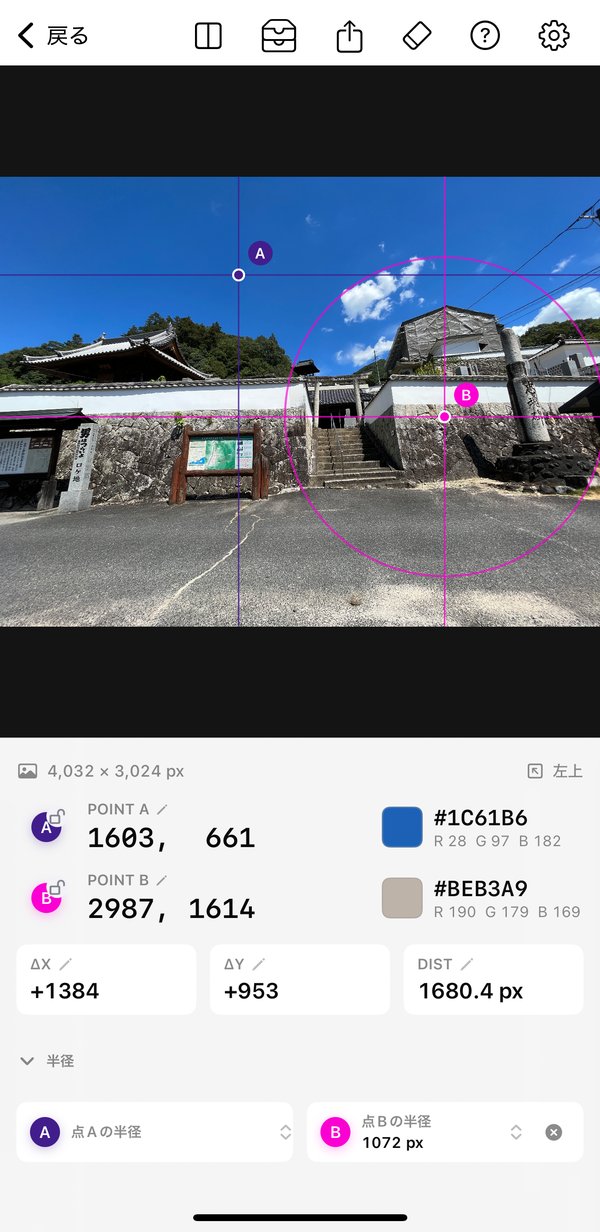
1Place points A and B on the first image and measure
-
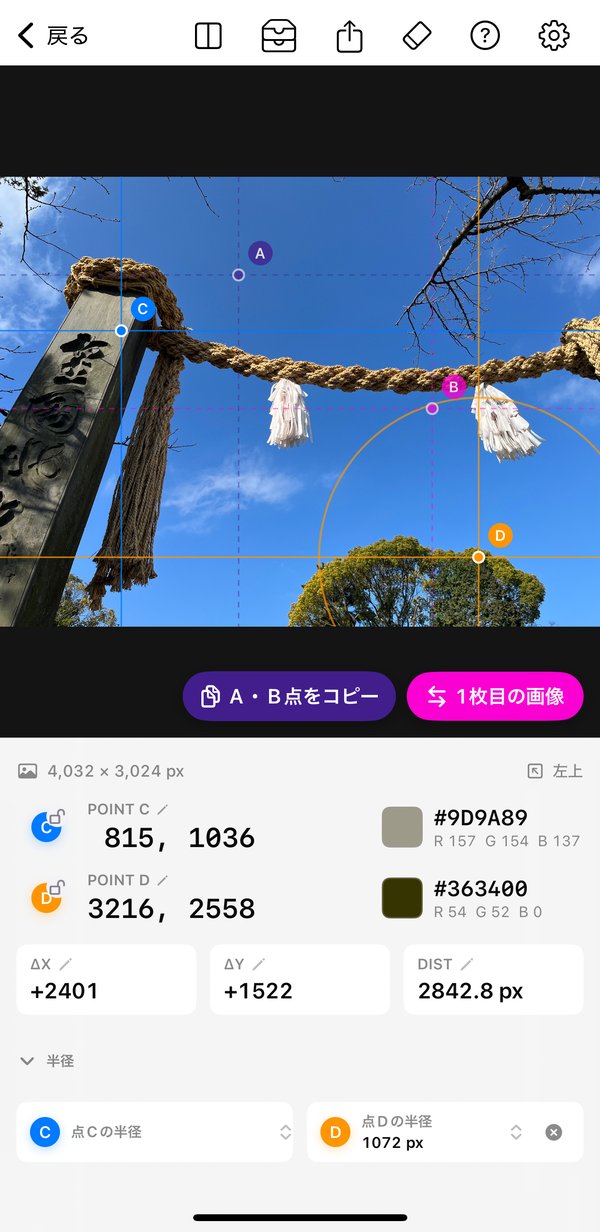
2On the second image, A and B appear as dotted lines. Tap Copy Points A & B to put C and D at the same coordinates, and switch images with the 1st Image button
When trying it with a video ad, comparing two images counts as one photo.
NewPro
Save measured images with their points, and load them later
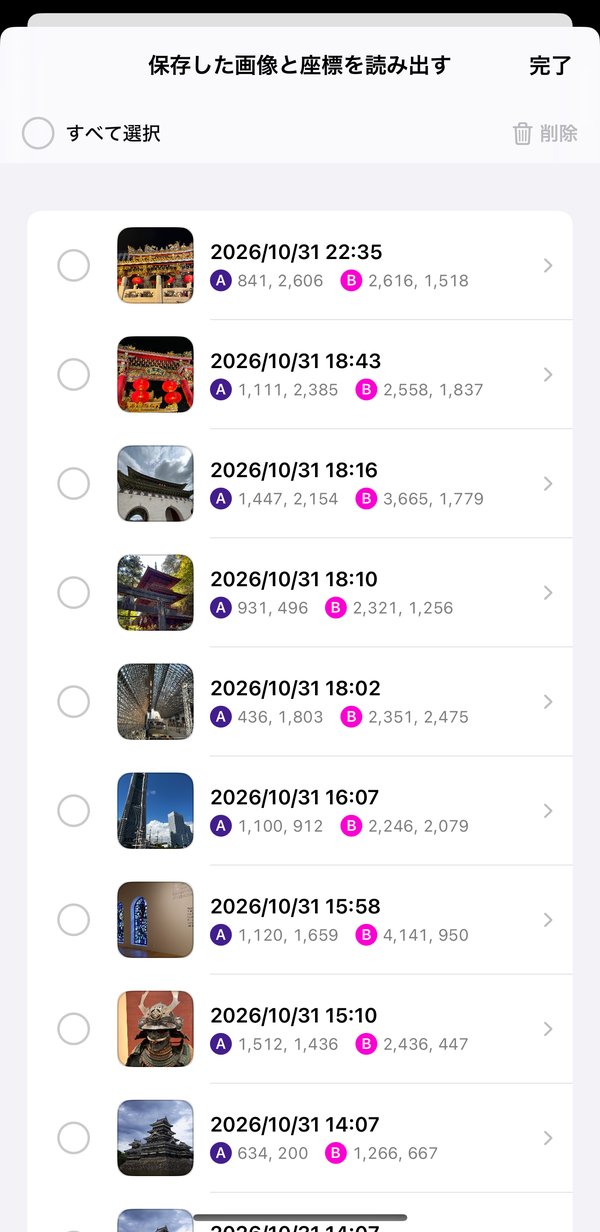
Save up to 10 measured images together with the coordinates of points A and B (radius included). Loaded points are placed locked, so you won't move them by accident — handy when you measure the same spot repeatedly or need a fixed reference for comparing a second image. This is a Pro (paid) feature.
- Load them from the photo list or while comparing a second image
- See the save date and the coordinates of A and B at a glance
- Delete several at once with Select All
New
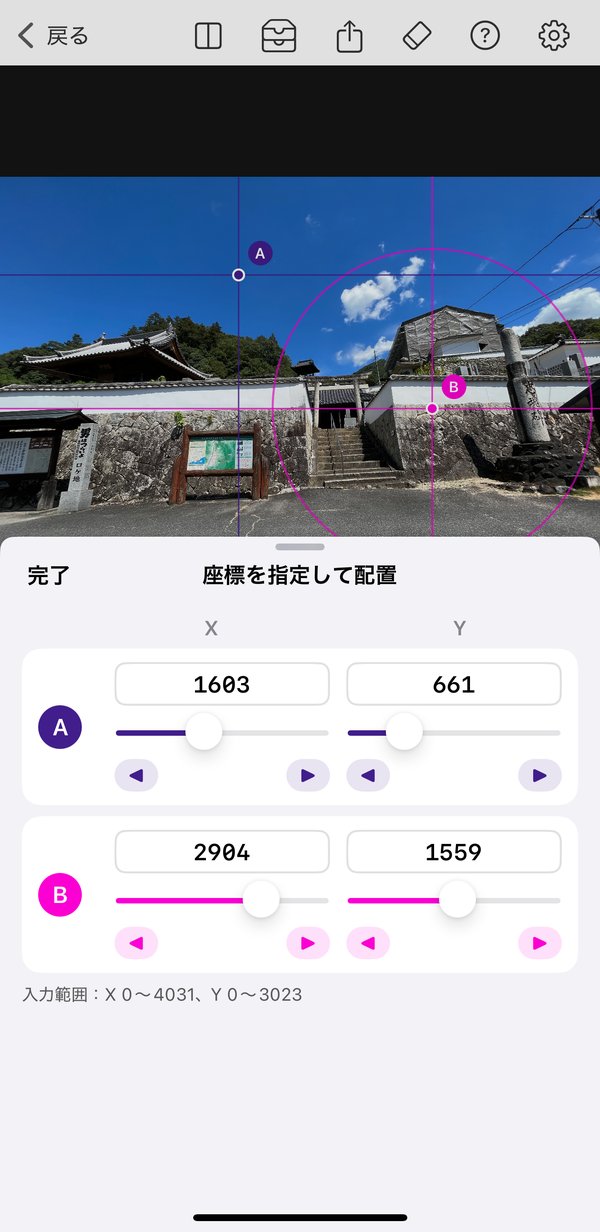
Enter coordinates to place points exactly
Tap the coordinates in the bottom panel to open Plot Coordinates, then type X and Y for points A and B or nudge them with sliders and the ◀ ▶ buttons. Hit the exact coordinates you want, even where a fingertip can't aim precisely.
- Shows the valid input range (the image size)
- Enter values from 0 to 1 when relative positions are shown
- Move several sliders at the same time with multiple fingers
New
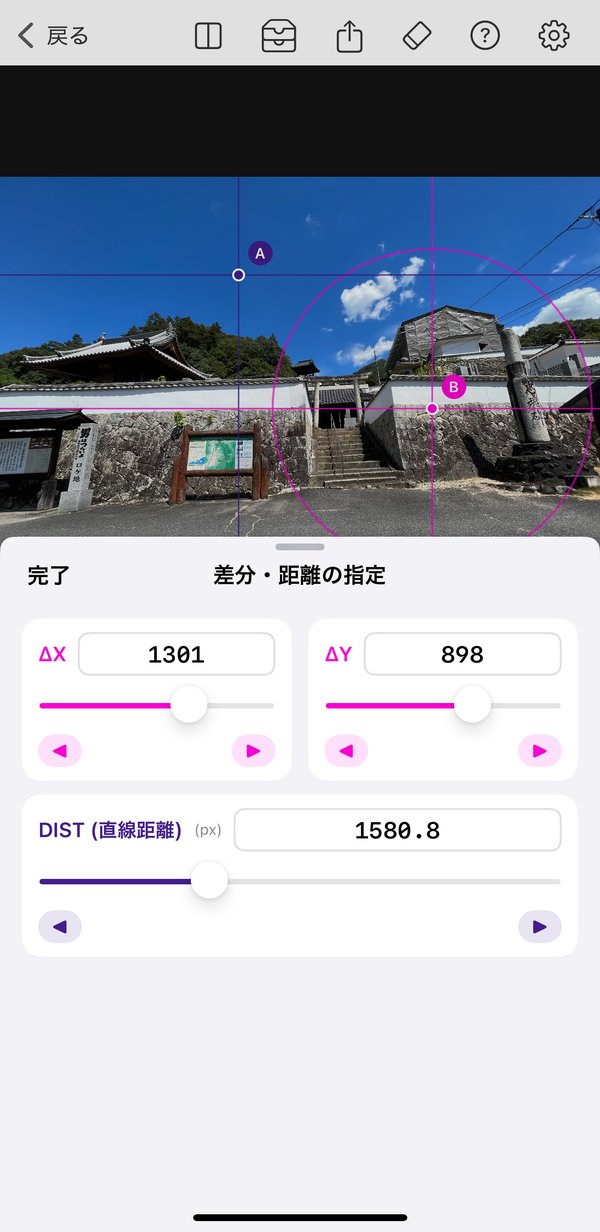
Set ΔX, ΔY or distance to move the other point
Tap ΔX, ΔY or DIST to open Delta & Distance Settings and adjust them by typing or with sliders. Put the other point at a set offset — say 1301 px right and 898 px down, or exactly 1500 px away.
- Lock a point to keep your reference fixed while adjusting
- Fine-tune with sliders and the ◀ ▶ buttons
Now free
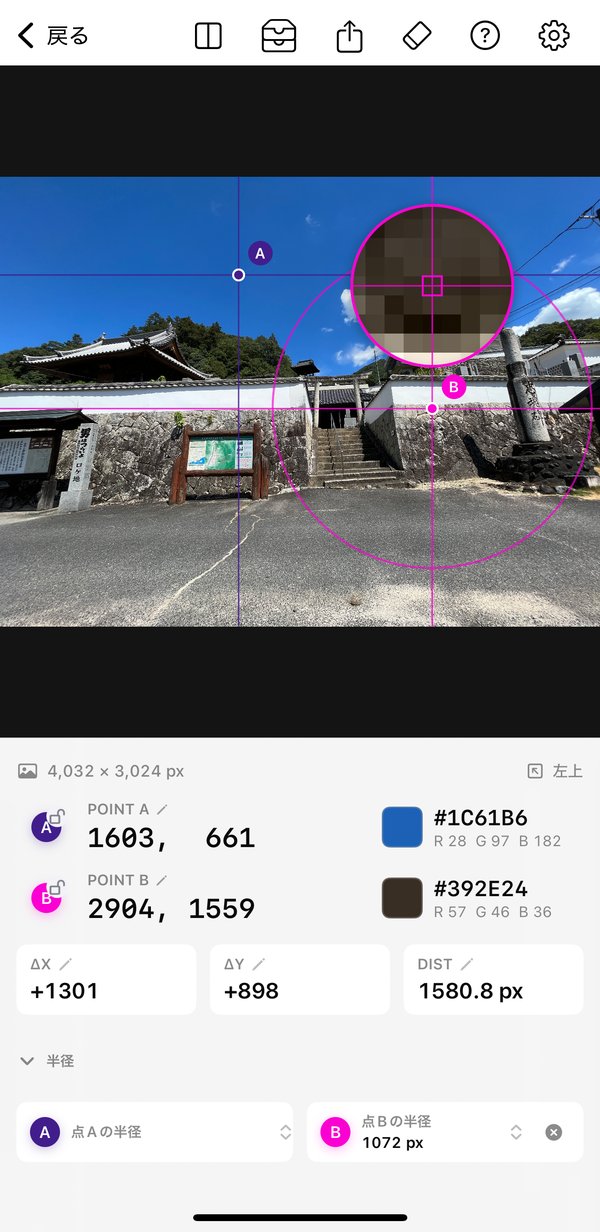
Magnifier, origin position, relative positions and more are now free
The magnifier, changing the origin position, relative (0–1) positions and sharing with the coordinate panel used to be Pro features. They are now free with no usage limit, so pixel-perfect placement is available without a purchase.
- The magnifier appears while you place or fine-tune points
- Put the origin (0, 0) in any of the four corners
Other improvements
- Choose the appearance: match the system, light or dark
- Buying Pro removes the ad from the photo list
Frequently asked questions
What images can I measure?
Any image in the Photos app on your iPhone or iPad, including screenshots.
Can it measure real-world lengths in cm or mm?
No. The app measures coordinates and distances on the image itself, in pixels. There is no conversion to physical lengths.
How much can I do for free?
Tap-to-measure, coordinates, color picking, X/Y difference and distance, the magnifier, origin position, relative positions, radius circles and sharing are free with no usage limit (with ads). Pro (monthly, yearly or lifetime) adds two-image comparison and saving/loading images with their points (up to 10), and removes the ad from the photo list. You can try two-image comparison on 3 photos by watching a video ad.
Are my images sent to a server?
No. Images are processed on your device and never sent to our servers or any third party's. For iCloud Photos the app may connect to Apple's iCloud to load the original images, and the free version uses the network to show ads.
Which devices are supported?
iPhone with iOS 18.4 or later and iPad with iPadOS 18.4 or later.
How is this different from Image Compare?
Coord & Color measures positions, distances and colors on images as numbers, and can open two images to compare them at the same coordinates (Pro). Image Compare overlays two images or colors their differences to check how they look different.